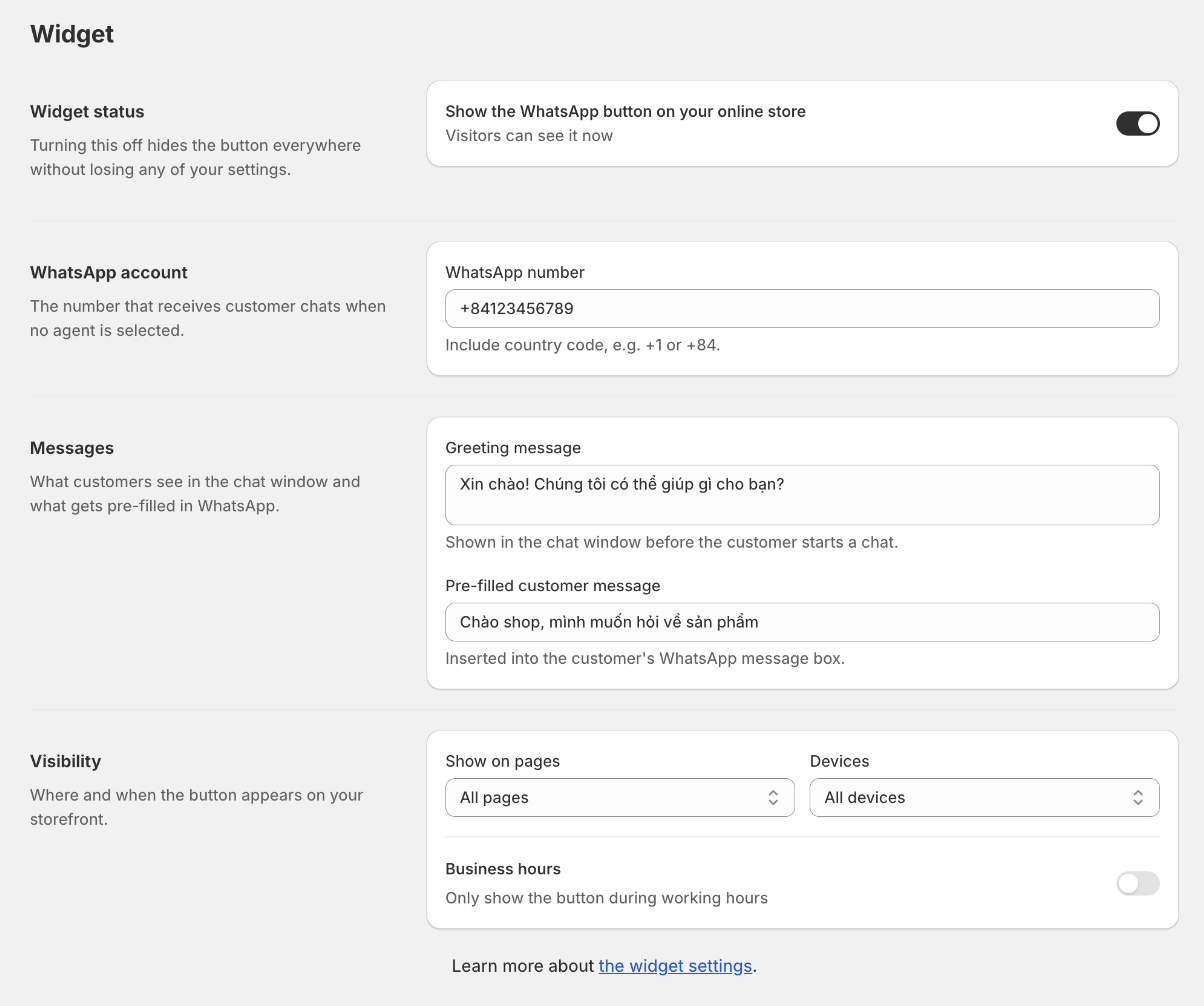
Widget: number, messages, and visibility
The WhatsApp number is where chats land when a customer does not pick a specific agent. Always include the country code, for example +84 or +1.
The greeting appears at the top of the chat window. The pre-filled message is what lands in the customer's WhatsApp message box — they can edit it before sending.
One greeting covers the whole store, but you can write a different one for product pages, collections, the cart, and the home page under "Write a different greeting for some pages". Someone reading a product is asking about that product; someone sitting in the cart is usually stuck on shipping or payment. Leave a page empty and it falls back to the main greeting, so you only write the ones worth saying differently. Merge tags work in these too.
Both can carry merge tags that fill themselves in from the page the customer is on: {{product}}, {{price}}, {{variant}}, {{collection}}, {{cart}}, {{url}}, and {{shop}}. So a message reading “Hi, I have a question about {{product}}” arrives already naming the item.
A tag with nothing behind it — a product name on the home page — drops its whole line instead of leaving a gap, so the message never arrives half-finished. Write one idea per line and this behaves the way you would expect.
Visibility controls where the button appears: all pages, home only, product pages only, or the cart page. You can also limit it to desktop or mobile.
The button cannot appear on checkout. Shopify runs checkout on a separate, locked surface that theme app embeds have no access to — only Checkout UI extensions run there. Any app that promises a chat button on checkout is either using that different technology or not showing you the checkout you think it is.
Business hours hide the button outside your working hours, or show it greyed out with the time you are back. This is the only availability signal the app can verify, so it is the only time a live status dot appears.
Writing the messages is the part the app can do for you. The ✨ button in each field writes or rewrites that one message; selecting text pops up a small toolbar with Improve, Fix, and an Ask box for anything else (“make it sound less formal”); and Generate all takes one description of your shop — what you sell, the tone you want — and drafts every message at once, each shown for your approval before anything is saved. Every store has 100 free AI uses a month; the counter next to Generate all shows what is left, and typing suggestions cost nothing.
The same selection toolbar adds WhatsApp's own formatting — bold, italic, strikethrough — plus emoji. It arrives as real formatting: styled in the chat window's greeting, and styled again in WhatsApp when the customer sends the pre-filled message.
The Test button next to the number opens a WhatsApp chat to exactly the number you typed — the one check that proves messages will reach your phone before a customer tries.