
Greeting bubble
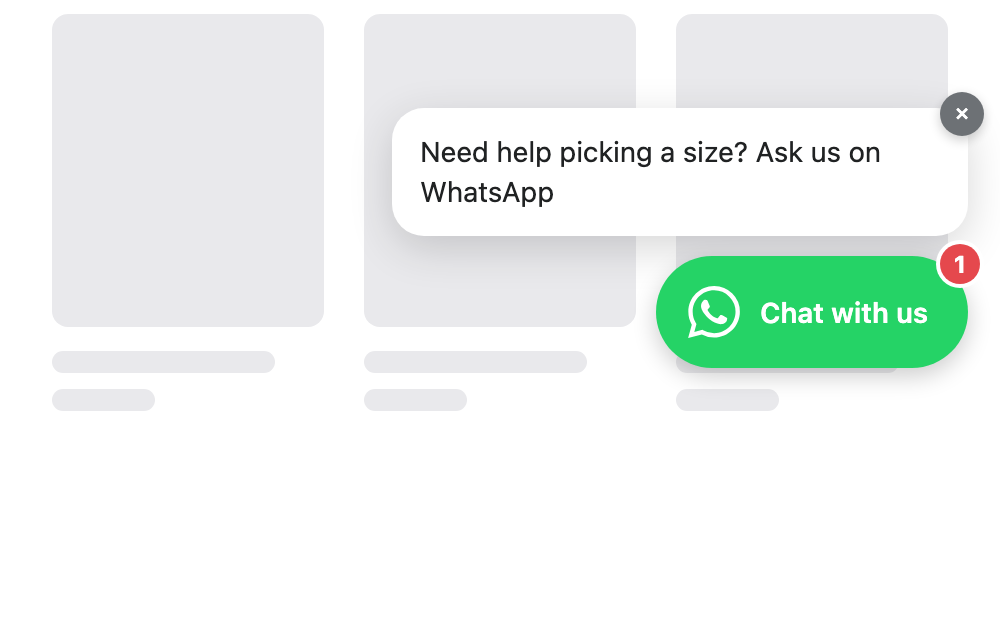
Most visitors never click a chat button — not because they have no question, but because clicking first feels like commitment. The greeting bubble is the smaller step: after someone has spent real time on your store, a short message appears beside the button, the way a shop assistant looks up and says hello.
It is off until you switch it on, in Appearance. Nothing about your storefront changes until you do.
When the bubble appears it arrives like a message: the button gets a red “1” badge and a ring in your button colour, and a soft two-note chime plays. The 1 is honest — it is the greeting waiting to be read — and badge, ring, and bubble all leave the moment the visitor opens the chat, taps the bubble, or closes it.
- Turn on Greeting bubble in Appearance, under the button settings.
- Write the line. One sentence works best — it sits beside the button, not in place of your page. Ask something a customer would actually answer: “Need help with sizing?” beats “How can we help you?”.
- Choose how long to wait. Fifteen seconds is a good start: long enough that the visitor is reading rather than passing through.
- Save. The bubble is live on your storefront immediately.
Common questions
Does the timer run while my page is in a background tab?
No. It counts only time the tab is actually open and visible, so a visitor who leaves your store in another tab and comes back an hour later does not return to a bubble already waiting.
Will it keep popping up on every page?
No. It appears once per visit. If someone closes it, it does not come back during that visit at all.
Does it cover my product page on a phone?
No. It is a small bubble beside the button, not the chat window — your content stays readable, which is why it is safe to leave on for mobile visitors.
How do I tell whether it is working?
Analytics counts the bubble separately from ordinary clicks, so your click-through rate keeps meaning what it always did: visitors who chose to open the chat on their own.
Why did I not hear the chime?
Browsers only let a page make a sound after the visitor has clicked, tapped, or typed on it — a rule of the browser, not the app. A visitor who scrolls and reads without touching anything sees the badge and the ring but hears nothing. There is no volume to set: the chime is two soft notes, quieter than a system alert.
Can I keep the bubble but drop the badge or the chime?
Not yet as separate switches — they arrive together with the bubble. If the chime is wrong for your store, tell us; a sound toggle is the obvious next step and hearing that you want it moves it up the list.