
Order automations (beta)
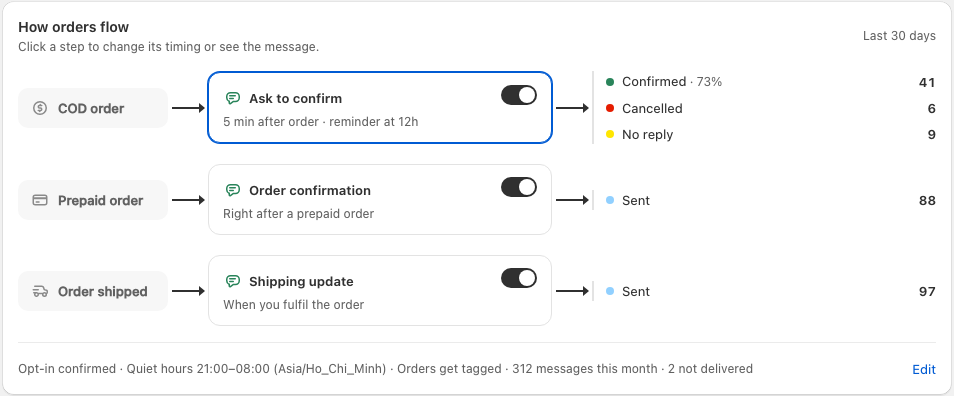
Order automations send WhatsApp messages about an order from your own business number. Ask to confirm goes to cash-on-delivery buyers, with Confirm order, Cancel order and Message the shop buttons, so you only ship orders someone means to pay for. Message the shop lets a buyer send a new delivery address or a question; it is added to the order's note in Shopify with a cod-buyer-message tag, and shows in Recent messages. Order confirmation goes to prepaid buyers right after they order. Shipping update goes out when you fulfil an order. A COD order gets Ask to confirm, never both.
Turn them on from the Order automations page. If no WhatsApp number is connected yet, the page asks you to connect one right there with Connect with Facebook; until then the diagram shows what you'll get but can't be changed. Cart recovery uses the same number, so you only connect once. Tick the opt-in box: WhatsApp requires that your customers agree to order updates, so say so in your checkout or privacy policy. Then switch on the steps you want in the diagram. Order confirmation and Shipping update use Meta's ready-made messages, which are approved the moment you switch them on. Ask to confirm uses our own message with the two buttons; we submit it to Meta for you, usually approved within minutes and at most 24 hours. Messages are written in your store's language: English, Spanish or Vietnamese.
Want your own words, say to add the carrier and tracking number to Shipping update? Click the step, then Customize message. Write your message and add the order details with the buttons under it: first name, order number, store name, total, or carrier and tracking number. Send to Meta for review sends it to Meta, which usually approves it within minutes; buyers keep getting the default message until it's approved, and if Meta rejects it you see why. Use the default switches back at any time.
Click Ask to confirm in the diagram and its settings open right under it. Set its timing: how long after the order to ask, when to send one reminder, and when to count the order as unanswered. Messages wait out your quiet hours (9pm to 8am in your store's time zone by default) instead of waking buyers up.
Click Allow order updates to let answers change your orders. Shopify asks you once. Confirmed, cancelled and unanswered orders then get a cod-confirmed, cod-cancelled or cod-unconfirmed tag, so you can filter them before shipping. You can also choose to cancel the order when the buyer taps Cancel; stock goes back and the buyer is not notified by Shopify. If you ship or cancel an order before the buyer answers, the app stops asking.
Recent messages lists every order the app messaged in the last 90 days and what happened: sent, confirmed, cancelled, no reply, or why nothing went out, such as no usable phone number. A tag Shopify refused shows its reason with a Retry link.
What it keeps: for each order it messages about, the order number, the customer's first name and phone number, the total, the tracking number once it ships, and anything the buyer writes after tapping Message the shop. These are deleted after 365 days, when a customer asks Shopify to erase their data, and when you uninstall.
Common questions
How does the app know an order is cash on delivery?
From the order's payment method. Any manual payment method whose name mentions cash on delivery or COD counts, in English and the common local spellings. Paid orders never get Ask to confirm.
The page says Meta did not accept a message.
Meta reviews each message before it can be sent and the banner shows its reason. "Restricted from creating a new template" means Meta has limited your WhatsApp Business account itself: open WhatsApp Manager, check Account quality for the reason, fix it (often verifying your business or a display name Meta has not approved yet), then click Try again.
The diagram is greyed out and I can't change anything.
Nothing on the page can send until there is a WhatsApp number Meta lets the app use. The card at the top says which: no number connected yet (click Connect with Facebook), the connection has expired (connect again with the same number), or Meta has blocked the account or number (open WhatsApp Manager for the reason, or disconnect and use another number).
Why does my custom message need review when the default doesn't?
Meta pre-approves its own ready-made messages, so they work straight away on every WhatsApp Business account. Any wording you write yourself is checked by Meta first, usually within minutes. Order messages must stay about the order: a discount code or promotion in one gets it rejected.
A buyer did not get a message.
Recent messages shows the reason next to the order. The usual ones are no usable phone number on the order, the message still in Meta's review, or the automation being off when the order came in.