Analytics
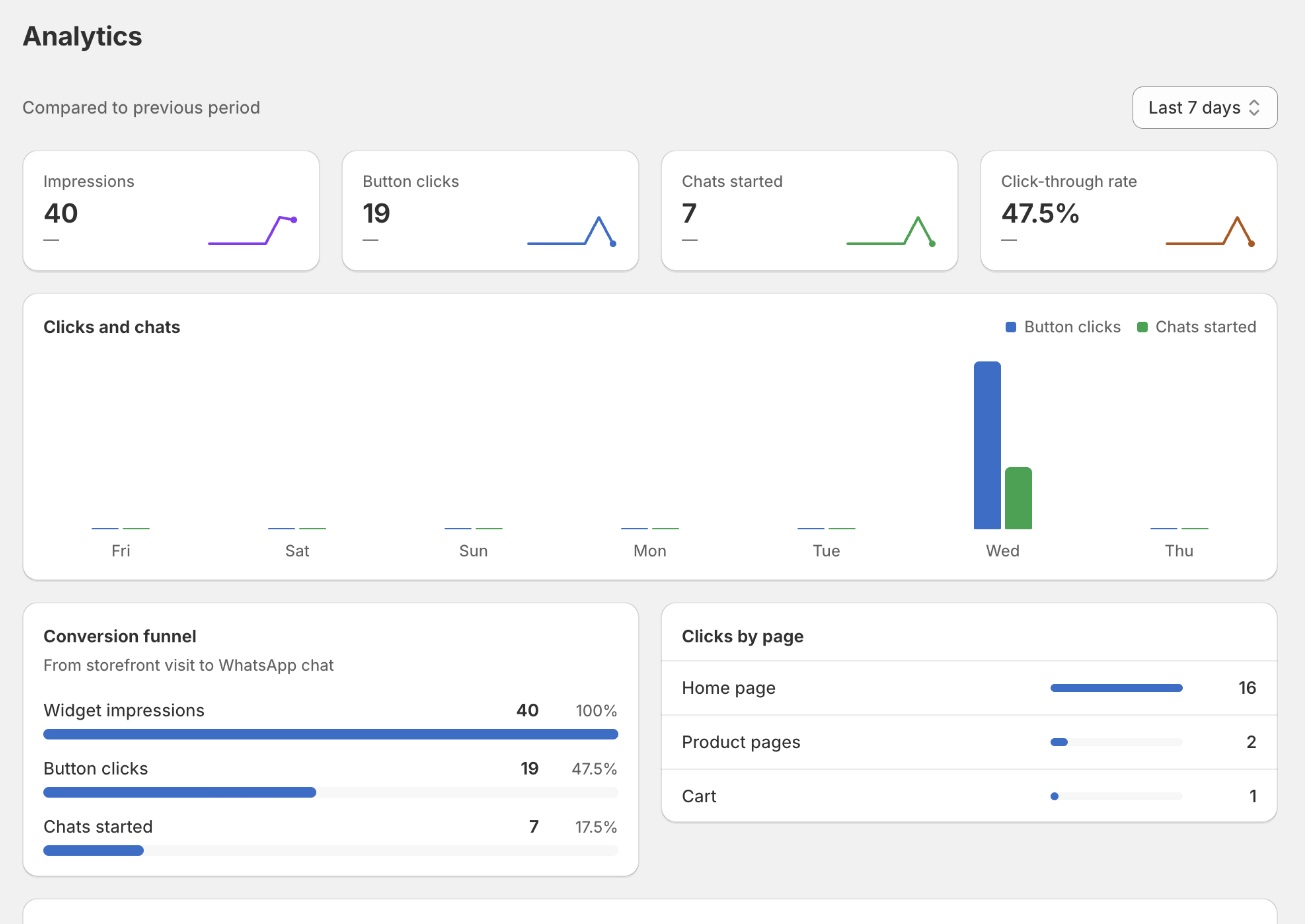
Analytics count real events from your storefront: an impression when the button renders, a click when it is pressed, and a chat when WhatsApp actually opens. Nothing is estimated.
The funnel shows how many visitors move from seeing the button to starting a chat. Clicks by page tells you where customers need help most, which is usually the fastest way to find a confusing product page.
Numbers start from the moment the app embed goes live. An empty chart means no traffic yet, not a broken setup.
Revenue from chat answers the question the other numbers cannot: what the widget earned. An order is credited when the shopper's phone number or email matches a pre-chat form submitted in the previous 7 days — so it only works if the pre-chat form is on, since that form is the only place the widget learns who someone is.
The card shows the revenue credited, how many orders that was, and what one chat is worth on average. Underneath, how many of your leads went on to buy and how long they usually took.
Read it as a floor, not a precise figure. A shopper who chats and then orders with a different email is invisible to it, and an order is credited to the widget even if the shopper would have bought anyway. Orders cancelled or refunded later are not deducted. It is the honest lower bound on what chat is worth, which is the number worth arguing from.