
Cart recovery (beta)
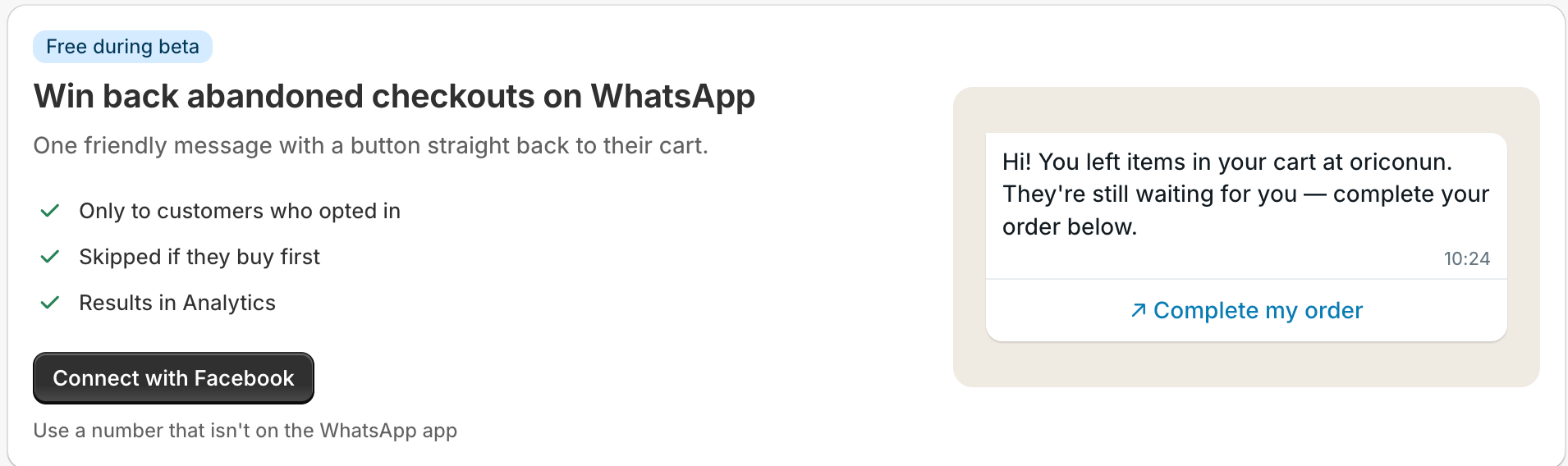
Cart recovery sends one WhatsApp message to a customer who left checkout without paying, with a button that opens their own cart, ready to finish the order. It is free while in beta.
Setting it up takes about five minutes, in this order on the Cart recovery page. First, Allow checkout access: Shopify asks you once, and the app then reads only a checkout's phone number, marketing opt-in, value, and link. Second, Connect with Facebook: sign in, pick or create your business, and choose the number reminders are sent from. Third, Meta reviews the reminder message, which we submit for you; this usually takes minutes and at most 24 hours, and the page updates by itself. Last, switch on Send reminders and choose how long to wait: one hour suits most stores.
The number you connect must not be in use on the WhatsApp phone app, and it must be able to receive a verification code by text or call. Once connected it sends through WhatsApp's business platform, so use a separate number from the one you chat on day to day.
Reminders only go to customers who agreed to marketing messages, which WhatsApp requires. Turn on SMS marketing in Shopify's checkout settings so customers can tick that box when they enter their phone number; the page warns you when many abandoned checkouts can't get a reminder for this reason. No reminder is sent if the customer completes the order first.
The Activity list shows every abandoned checkout from the last 90 days and what happened to it: sent, delivered, read, recovered, or why no reminder went out. Revenue recovered, and the share of reminders read, are on the Analytics page.
What it keeps: for each abandoned checkout, the customer's phone number, cart value, and checkout link, and the WhatsApp messages sent. These are deleted after 365 days, when a customer asks Shopify to erase their data, and when you uninstall. Disconnect the WhatsApp number at any time from the WhatsApp account card; the app's access to it ends at once.
Common questions
Which languages does the reminder support?
English for now. More languages are coming during the beta.
The page says Meta has blocked or rejected my WhatsApp account.
Meta reviews every business account, its display name, and the number. If it declines one, reminders can't be sent from it. Open WhatsApp Manager from the banner to see Meta's reason. The usual fix is to use your store's name as the display name, verify your business in Meta Business Manager, or disconnect and connect a different number.
The page says the WhatsApp connection has expired.
Meta no longer accepts the connection the app holds for your number, so nothing can be sent until it's renewed. Click Connect with Facebook on the page and choose the same number; your settings, reminders and order steps stay as they were. The same banner shows on Order automations, and reconnecting on either page fixes both.
Can I use the number I already chat on in the WhatsApp Business app?
Not yet. A number can be on the WhatsApp app or on WhatsApp's business platform, not both, so connect a separate number for reminders.